With Windows Subsystem for Linux (WSL), running a Linux environment on Windows is no longer complicated. The setup is usually smooth until a small configuration detail, like a hostname mismatch, suddenly throws an unexpected and confusing error such as:
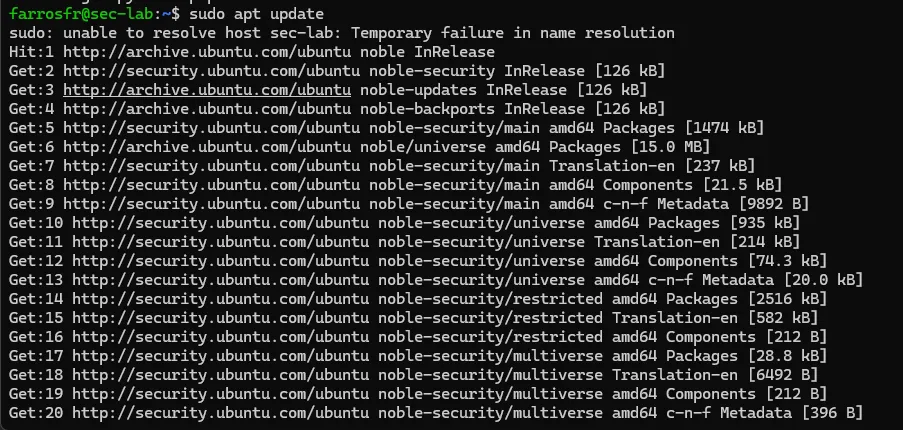
sudo: unable to resolve host <hostname>: Temporary failure in name resolutionIn this guide, I’ll walk through:
- Installing Ubuntu on WSL
- Setting it as the default distribution
- Creating a proper user
- Changing the hostname cleanly
- Fixing the “unable to resolve host” error
- And finally: why I use WSL instead of Kali Linux in VirtualBox — including the downsides.
1. Installing Ubuntu on WSL#
First, check existing WSL distributions:
wsl -l -vIf Ubuntu is not installed:
wsl --install -d UbuntuAfter installation completes, launch it:
wslor open via windows start.
You’ll be prompted to create a default Unix user account. Choose a clean and professional username (for example, your GitHub handle). This becomes your Linux home directory:
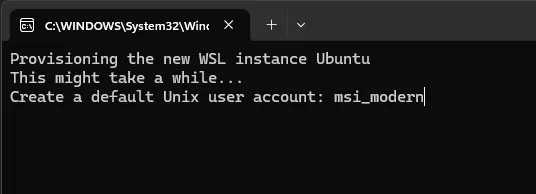
/home/yourusername2. Setting Ubuntu as Default#
If Docker Desktop is currently your default WSL distro:
wsl -s UbuntuVerify:
wsl -l -vThe asterisk (*) should now be next to Ubuntu.
3. Changing the Hostname Properly#
To rename your machine, example:
sudo hostnamectl set-hostname sec-labRestart WSL:
wsl --shutdownReopen WSL and your prompt should look like:
username@sec-lab:~$4. Fixing the “Unable to Resolve Host” Error#
After changing the hostname, you may see:
sudo: unable to resolve host sec-lab: Temporary failure in name resolutionThis happens because /etc/hosts still contains the old hostname.
Edit it:
sudo nano /etc/hostsYou might see:
127.0.0.1    localhost
127.0.1.1 Old-HostnameReplace the second line with, example:
127.0.1.1 sec-labSave, then restart WSL:
wsl --shutdownThe error should now be gone.
Installing Essential Security Tools#
After setup, install a minimal but powerful toolkit, like:
sudo apt update
sudo apt install -y \
curl wget git unzip \
net-tools dnsutils \
nmap python3-pipWhy I Use WSL Instead of Kali in VirtualBox#
Many people in cybersecurity default to Kali Linux inside VirtualBox. I did too. But over time, my workflow changed.
Here’s why I prefer WSL for daily use.
1. Performance#
WSL 2 runs with near-native performance. No heavy VM overhead. No manually allocating RAM and CPU.
VirtualBox always feels heavier.
2. Workflow Integration#
WSL integrates seamlessly with:
- Windows filesystem
- VS Code
- Docker
- Git
- Windows Terminal
You can develop in Windows while running Linux tools in parallel smoothly.
3. Minimalist and Intentional#
Kali comes with hundreds of preinstalled tools.
WSL + Ubuntu forces you to:
- Install only what you need
- Understand your environment
- Build your own stack
That’s better for learning and discipline.
But WSL Is Not Perfect (The Cons)#
In security communities, WSL often gets criticized and many of it is valid.
Here are the most common concerns:
1. Limited Hardware-Level Capabilities#
WSL does not support:
- Native Wi-Fi monitor mode
- USB wireless injection
- Direct hardware access like a real Linux system
If you’re doing wireless attacks or hardware exploitation, Kali in a VM or bare metal is still necessary.
2. Networking Quirks#
WSL networking can be confusing:
- Changing IP addresses
- Port forwarding edge cases
- localhost behavior differences
It works but sometimes troubleshooting feels non-intuitive.
3. Not Fully Isolated#
A VM provides clear isolation from your host OS.
WSL is more integrated. That’s great for productivity, but:
- Mistakes can affect your Windows filesystem
- It’s not as sandboxed as a traditional VM
For risky malware analysis, a dedicated VM is safer.
Final Thoughts#
To be honest, I prefer Linux.
If I had the choice, I would run Linux as my primary system. I appreciate its philosophy, control, and engineering mindset. However, professional demands often require Windows, and that’s where WSL becomes a practical bridge.
WSL is not a full replacement for native Linux or Kali in a VM, especially for hardware-level testing or isolated lab environments. But for development, automation, CTFs, and daily security work, it provides a fast and efficient workflow.